If you are searching "how to stop getting messages on OnlyFans," you are probably past the point of being a little annoyed. You may feel uncomfortable, distracted, or completely burned out by your DMs.
The good news is that resources point to three practical ways to reduce the noise: restrict, block, and hide conversation. These three things are not the same, and simply choosing the right one can save you stress fast.
In this guide, you will learn what each option actually does, when to use restrict vs block, what to do about spam and creepy requests, and how to make DMs feel lighter long term.
This guide is for 18+ creators who want more control without turning every bad DM into a bigger mess.
How to immediately stop receiving DMs
This section gives you the quickest options resources clearly describe. The goal is simple: pick the lightest tool that solves the problem and protects your peace.
There's an option to restrict if you just want some peace
Restrict is usually the best first move for fans who aren't harmful but are draining. Resources suggest the person may still be able to see your content, but their ability to interact with you may become more limited, and they usually are not notified.
Source: Social Rise — https://social-rise.com/blog/onlyfans-block-unblock-and-restrict
Example: nonstop “hey” DMs, repeated freebie asks, or guilt-heavy chat you do not want to keep carrying.
There's an option to block if you want a complete break
Block is the hard stop. Block is the better move for threats, stalking vibes, blackmail pressure, or repeated boundary pushing.
Hide conversations if your inbox is overwhelming
Sometimes you do not need a full relationship change. You just need the thread off your screen. Supercreator describes a hide conversation tool that removes threads from the main inbox without deleting them, which can make DMs feel less chaotic.
Source: Supercreator — https://www.supercreator.app/guides/three-hidden-onlyfans-features-you-never-heard-about
Restrict vs block vs hide on OnlyFans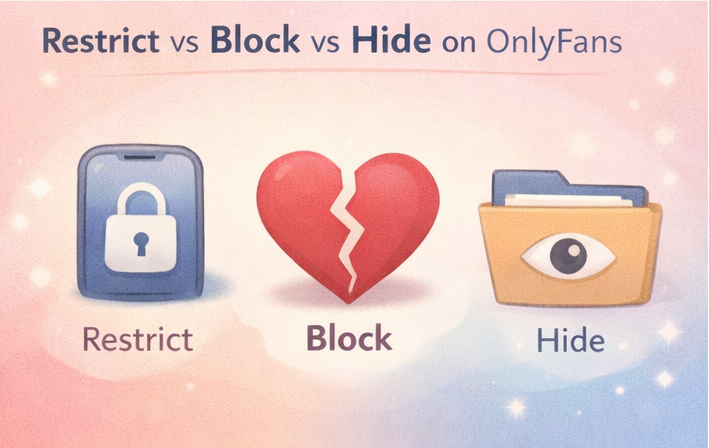
In this section, we'll break down the difference between Restrict and Block in simple terms, and show how Hide fits into the picture. Picking the right option keeps things calmer and saves your time.
Here is the comparison table formatted for easy copying and pasting into your document.
Interaction Comparison: Restrict vs. Block vs. Hide
Option | What it changes | Best for | What the fan sees |
Restrict | Limits how their messages reach you (quiet without drama). | Needy/annoying but not dangerous. | Usually still sees your page; unaware they are restricted. |
Block | Full cutoff (no access, no contact). | Threats, stalking vibes, boundary pushing. | Can’t access your profile or content; knows they are blocked. |
Hide | Cleans up your inbox view. | Visual clutter, old threads. | No change (the action is entirely on your side). |
What remains visible to fans
With Restrict, public guides say the fan may still see your profile and content. With Block, they usually lose access to your page and cannot contact you. With hide, nothing changes for the fan because it is mainly an inbox-cleanup tool on your side.
Source: Social Rise — https://social-rise.com/blog/onlyfans-block-unblock-and-restrict
What changes for creators
Restrict gives you distance. Block gives you a safety wall. Hide gives you visual relief. Supercreator also says hidden threads can be viewed again from a hidden area later, so hide is closer to “out of sight” than “gone forever.”
Source: Supercreator — https://www.supercreator.app/guides/three-hidden-onlyfans-features-you-never-heard-about
How to choose in 10 seconds
Choose one: If you want distance, use Restrict. If you want them gone, use Block. If you just want to reduce visual noise, use Hide. These options alone can clear up a lot of hesitation.
What you may not be able to control
This section keeps you from wasting energy on settings that may not exist in the way you want. It also answers common searches around how to stop getting spam messages on OnlyFans, auto-generated messages, and how to remove expired subscriptions on OnlyFans.
This is not legal advice. OnlyFans policies are subject to change. Always check the current Terms of Service.
If the volume of difficult messages is making the platform feel unsustainable, this guide to OnlyFans safety tips covers the boundaries, account settings, and habits that reduce exposure to harmful interactions over time.
You may not be able to disable DMs with one click
Based on the resources reviewed here, the most clearly documented tools are Restrict, Block, and Hide. A single one-click option to disable all DMs is not clearly documented in the sources reviewed here. As a result, the most practical solution may be a set of small adjustments rather than one master switch. This may vary depending on the user's UI and account setup.
Source: Social Rise — https://social-rise.com/blog/onlyfans-block-unblock-and-restrict
Expired subscribers may still need to be sorted manually
If you are looking up how to remove expired subscriptions on OnlyFans, public guides explain hiding old conversations or managing expired fans more clearly than permanently removing every trace of them from view. In practice, that means cleanup may still be partly manual.
Source: Supercreator — https://www.supercreator.app/guides/three-hidden-onlyfans-features-you-never-heard-about
How to deal with spam and offensive DMs with minimal stress
In this section, we will talk about the process, not about the available features. The goal is to protect your time, mood and security so you're not stuck reacting all day.
Managing your DM boundaries is easier when your overall messaging workflow is structured from the start — this guide to OnlyFans message ideas and daily DM routines includes boundary phrases and a 15-minute daily workflow that prevents inbox overwhelm before it starts.
Step 1: Restrict if someone is draining your energy
Use restrict when a fan is annoying, needy, or emotionally heavy, but not actively dangerous. It stops the drip of stress without forcing a bigger confrontation than you need.
Step 2: Block and report harmful behavior
If a DM contains threats, suspicious links, off-platform payment pressure, or obvious manipulation, move straight to block and report. SafetyDetectives warns that creators can face phishing, malware, scam accounts, and attempts to pull them to third-party sites, so fast action matters here.
Source: SafetyDetectives — https://www.safetydetectives.com/blog/how-to-stay-safe-on-onlyfans/
Step 3: Create a structure that won't drain you mentally
Do one short cleanup pass every day or every other day: reply, restrict, block, or hide. Keep two short boundary replies ready. If DMs are starting to feel like a full-time job, FanPort gives you a lower-stress way to manage fan chat without losing the personal connection that matters. It works as an AI-assisted support tool, not a fully automated bot, so you can move faster on routine messages while keeping your voice and boundaries intact. Paid subscribers and VIP fans still get human attention, with final checks and important replies handled by you. That means less time stuck in DM chaos, more space to focus on the fans who matter most, and a better chance to earn more through strong engagement even without a huge following. Want to grow faster with this service? Click here.
FAQ
Can you stop getting messages on OnlyFans without blocking someone?
Yes. Restrict is usually the closest option if you want the person quiet without fully cutting off access.
How do you stop getting spam messages on OnlyFans?
Start with Restrict for annoying accounts, then Block and report anything unsafe. Hide old threads so your inbox stops feeling flooded.
Source: Social Rise — https://social-rise.com/blog/onlyfans-block-unblock-and-restrict
What is the difference between OnlyFans restrict vs block?
Restrict may let the fan keep seeing your content while stopping interaction. Block is a full cutoff from profile, content, and contact.
Can fans opt-out automated messages on OnlyFans?
Publicly available resources do not clearly show a clean global opt-out for every kind of promotional DM, so the solution may differ based on your current UI and account view.
How do you remove expired subscribers on OnlyFans?
Publicly available resources more clearly describe re-following expired fans or hiding old conversations than deleting all expired-subscriber traces, so cleanup may still be manual.
Can you fully turn off DMs on OnlyFans?
Based on the resources reviewed here, a single switch to turn off all DMs at once is not clearly indicated. Therefore, creators frequently depend on Restrict, Block, and Hide.